LinkedIn for Professional Development
What is LinkedIn?
LinkedIn is the world’s largest professional network. In the modern job market, your LinkedIn profile serves as an extension of your resume. It is very helpful to have a professional social media account, especially because a lot of employers or graduate school admissions committees will look you up.

LinkedIn is a tool for:
- Networking
- Internship and Job Hunting
- Staying Up to Date with Your Field
- Personal Branding
- Visibility
When to use it
- Year 1-2: Use LinkedIn to explore and grow your network. You can use it to research career paths within your major and common companies that people work for.
- Year 3: Really focus on expanding your network and connecting with potential employers, research advisors, etc.
- Year 4: Use it to apply for jobs, request informational interviews, and signal to employers that you are open to work.
- This guide outlines the standards for creating and maintaining a professional profile and strategies for using the platform’s tools.
Creating a Profile
Unlike a resume, which is tailored to a specific job application, your LinkedIn profile addresses a broader audience. It should paint a complete picture of your academic and professional identity.
Profile Picture and Banner
It is important to have a headshot that is professional and appropriate to help personalize your profile and put a face to the name. Typical profile photos are shot shoulder’s up and faced forward in a clean outfit. Banners can have your preferred contact information, or depict something you are passionate about, but should be pleasing to the eyes. This could be a LinkedIn generated image, or an image you personally upload that showcases your personality, interests, or work. Some things to avoid would be blurry photos, photos with multiple people in it (for the profile), and any photo depicting something you would not want a future supervisor to look at.
Headline
Go beyond mentioning you are a student at UCI. Your headline is the first thing recruiters and potential connections will so, so you should use this space to really let people know who you are.
- A good potential formula is: [Major @ UCI] | Top Skills | [Career Interest]
- A good example could be: Urban Studies Major @ UC Irvine | GIS & Community Development | Aspiring City Planner
“About” Summary
This is your professional narrative. Use this section to talk about who you are including your interests, what you currently do, and what you want to do.
- Structure:
- Start with who you are and what you study
- Next, talk about your experience (field study, research labs, leadership roles, etc.)
- Make sure to include what you want to do in the future
- Make sure to incorporate keywords relevant to your industry (e.g., “data visualization, policy analysis, victim advocacy, etc.) to increase your visibility and search results
Experience
Here, you can put any professional or leadership experience you have. You can use bullet points similar to your resume. Focus on accomplishments and skills used, rather than just listing duties.
- Unlike a resume, it is good to include part-time jobs here, even if they are unrelated to your major or what you want to do in the future. They demonstrate transferrable skills like time management, customer service, and teamwork.
Education
You should make sure to list UCI in your education including dates, your major, and your GPA if it is higher than 3.5. You can also include Dean’s Honor List and any activities and societies you are associated with here.
Projects
In the projects section, you can touch on any research papers, class projects/presentations, and any lab work that you have done. In this section, you really want to show, not just tell
When describing the project, mention your specific assignment or goal, any tools or methods you used. For example, “conducted literature review” or “used SPSS to analyze...” Lastly, make sure to mention the outcome of your project such as “Presented findings to a class of 40.”
Example: Analyzed current municipal codes regarding unhoused populations in Orange County. Conducted a comparative analysis of three local cities and proposed a new 'housing-first' framework. Presented findings to the site supervisor and field study faculty advisor.
Skills
Skills can be very important because recruiters use software to search for candidates based on specific keywords. You want to have a mix of broad skills and specific technical skills.
Hard Skills Examples:
- Research: SPSS, Qualtrics, R, Python, Data Entry, Survey Design
- Design/Tech: Canva, Microsoft Excel, GIS, Adobe Creative Suite
Soft Skills Examples:
- Public Speaking, Critical Thinking, Community Outreach, Conflict Resolution, Grant Writing, Policy Analysis, Victim Advocacy
A good strategy could be looking at 3-5 job descriptions for jobs you want and then write down the skills they list in your skills section.
Courses
Do not list every single class you have taken. Instead, curate a list of 5-8 courses directly related to what you want to do and that tell a story about your specialization.
Alumni Tool and Researching Career Paths
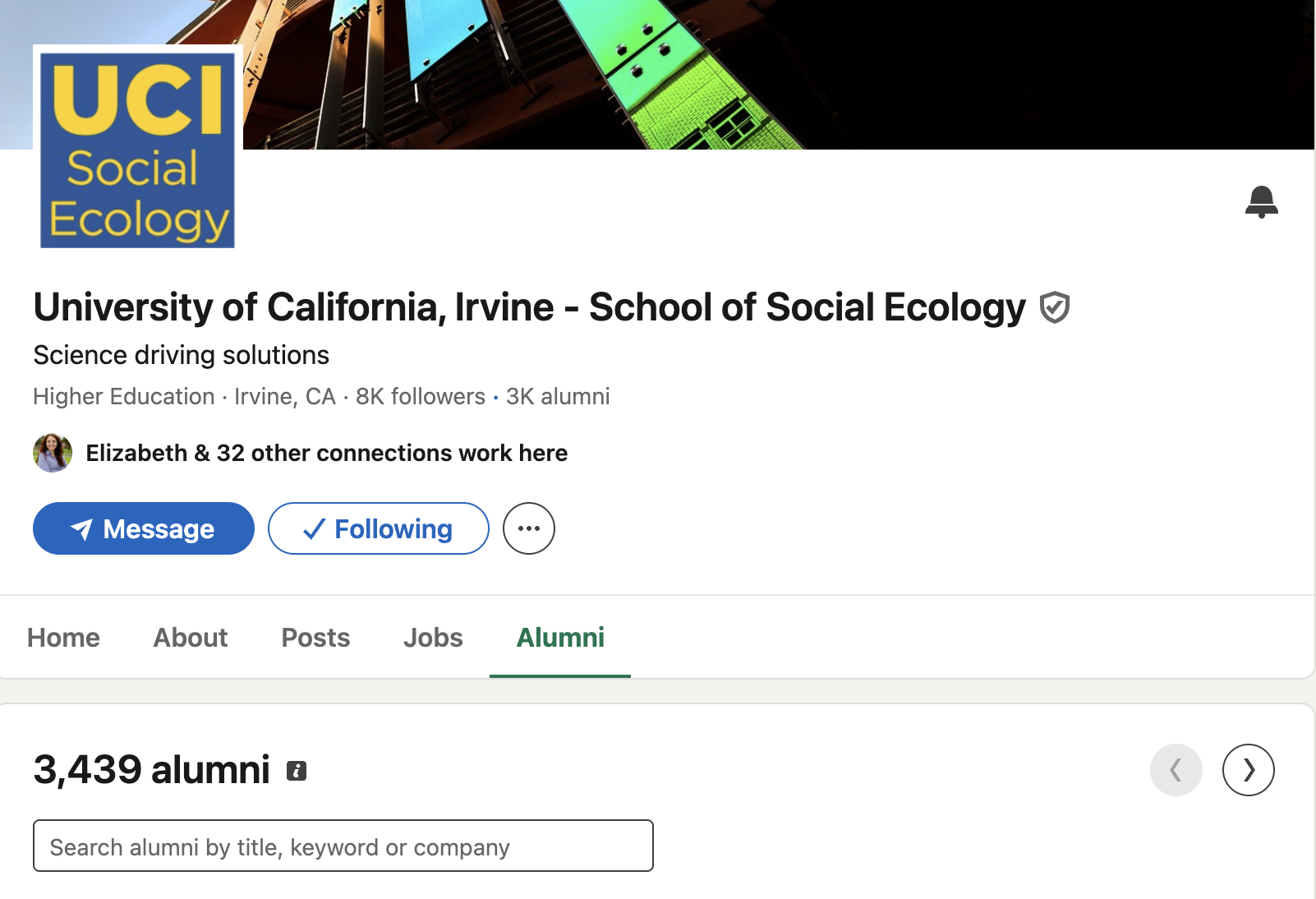
The Alumni Search Tool is a really great feature to help you visualize where graduates with your specific degree are working.
To access it, navigate to the official UCI or School of Social Ecology page. Next, select the “Alumni” tab. You can filter your results by your major, career, or other keyword.
With this information, you can identify which employers frequently hire alumni from your major, trace trajectories, or network. Alumni are really great resources for informational interviews because you share a common educational background.
Connecting
When connecting with someone, it is always a good idea to include a personalized note to explain your intent. It can be very short, but it will provide context as to why you may want to connect:
Connection Request Template/Example:
“Dear [Name], I am a [Year/Standing] [Major] student at UC Irvine researching careers in [Field]. I noticed you also majored in [Major] and are now working at [Company]. I would value the chance to connect and follow your work. Best, [Your Name]”
Establishing a Digital Presence
Once you build your profile, engagement is the best way to increase visibility
- Follow companies
- Follow the organizations you are interested in. This ensures that their job postings and news will appear on your feed
- Join Groups
- Join groups related to your major
- Engage
- Like or comment on posts you like or from your connections. This keeps your profile active and visible to your network even if you don’t personally post.
People will also be able to get a sense of your specialty based on the companies and people you follow and what you engage with. Make sure you are engaging with things that you are actually interested in.
Other Helpful Tips
Shorten Your URL
By default, your LinkedIn URL will be very long and include a lot of random numbers. To fix this, go to your profile and hit edit on “Public profile & URL” in the top right. Change your link to just include your name or initials. You can then put this clean link on your resume header.
Private vs. Public Viewing Mode
When you view someone’s profile, the default is that they will get a notification that you looked. There are three different types of viewing modes that you can strategically view and change in your settings. To do this, go to “Settings & Privacy” → “Visibility” → “Profile Viewing” and choose the type of viewing mode you want.
- Your name and headline (Public) can be helpful when you are job hunting or networking. Often, you want people to see that you are interested in them, so having your name attached to your profile is a good thing.
- When you have Private profile characteristics (Semi-Private) on, the person will see something like “Student at University of California, Irvine.” This can be best when you want to browse without fully revealing your identity.
- In Private mode, you are completely anonymous. This is best for when you are doing deep research or want to remain completely anonymous while viewing profiles.
Endorsements on Skills
Skills are more credible when other people vouch for them. Ask your friends or coworkers to endorse you or trade endorsements with people!
“Open to Work” Feature
You can turn this on to signal to recruiters that you are actively looking for a job. To set this, navigate to your profile picture, hit “Frames,” and then select “#OpenToWork.” You can choose to make this frame visible to all LinkedIn members or just recruiters.
Personal QR Code
You can get a QR code that leads directly to your LinkedIn profile by using the mobile app, hitting search, and then selecting the QR code icon in the top right. You can download this QR code and save it as your screensaver for easy access when you go to networking events or conferences! That way, you can easily and quickly ask people to connect on LinkedIn without having to search for one another.